Connect SEO tools directly to Claude
These tools work as a native part of Claude — no browser, no manual form-filling. Just ask Claude to "crawl example.com", "run an SEO checklist for example.com", "find keyword data for seo audit", or "what does example.com rank for" — and it will call the tool directly and return the results right in the chat.
Available tools
Crawls a website (BFS, up to 1000 pages) and returns data for every page: title, meta description, canonical, indexability (noindex/nofollow/robots), presence of structured data, Open Graph tags, heading counts, internal/external link counts, word count, page size, and load time.
domain— the domain or URL, e.g.example.commax_pages— how many pages to crawl (1–1000, defaults to 20)
A full 49-point technical SEO audit of the homepage: URL structure and redirects, technical SEO (compression, PageSpeed, AI crawler access in robots.txt), security and SSL, on-page SEO (title/meta/schema/sitemap), content volume, and local/social signals (Google Business Profile, social links, Open Graph).
domain— the domain or URL, e.g.example.com
Real search volume, CPC, competition level, and search intent for a keyword and its related/suggested keywords, sourced from DataForSEO. Each keyword includes 12 months of historical search volume trend data.
keyword— seed keyword or phrase, e.g.seo audit toollocation— DataForSEO location code (defaults to2840, United States)language— two-letter language code (defaults toen)limit— how many keywords to return, sorted by volume (1–200, defaults to 50)
The keywords a domain currently ranks for in Google — actual organic position, ranking URL, search volume, CPC, and competition level, sourced from DataForSEO Labs. Unlike keyword_research, this looks up a site rather than a topic.
domain— the domain to look up, e.g.example.comlocation— DataForSEO location code (defaults to2840, United States)language— two-letter language code (defaults toen)limit— how many ranked keywords to return, sorted by volume (1–500, defaults to 100)
1Copy the connector address
This is the only thing you'll need to connect:
https://mcp.ourseo.tools/mcp
2Add the connector in Claude
In claude.ai (web) or Claude Desktop:
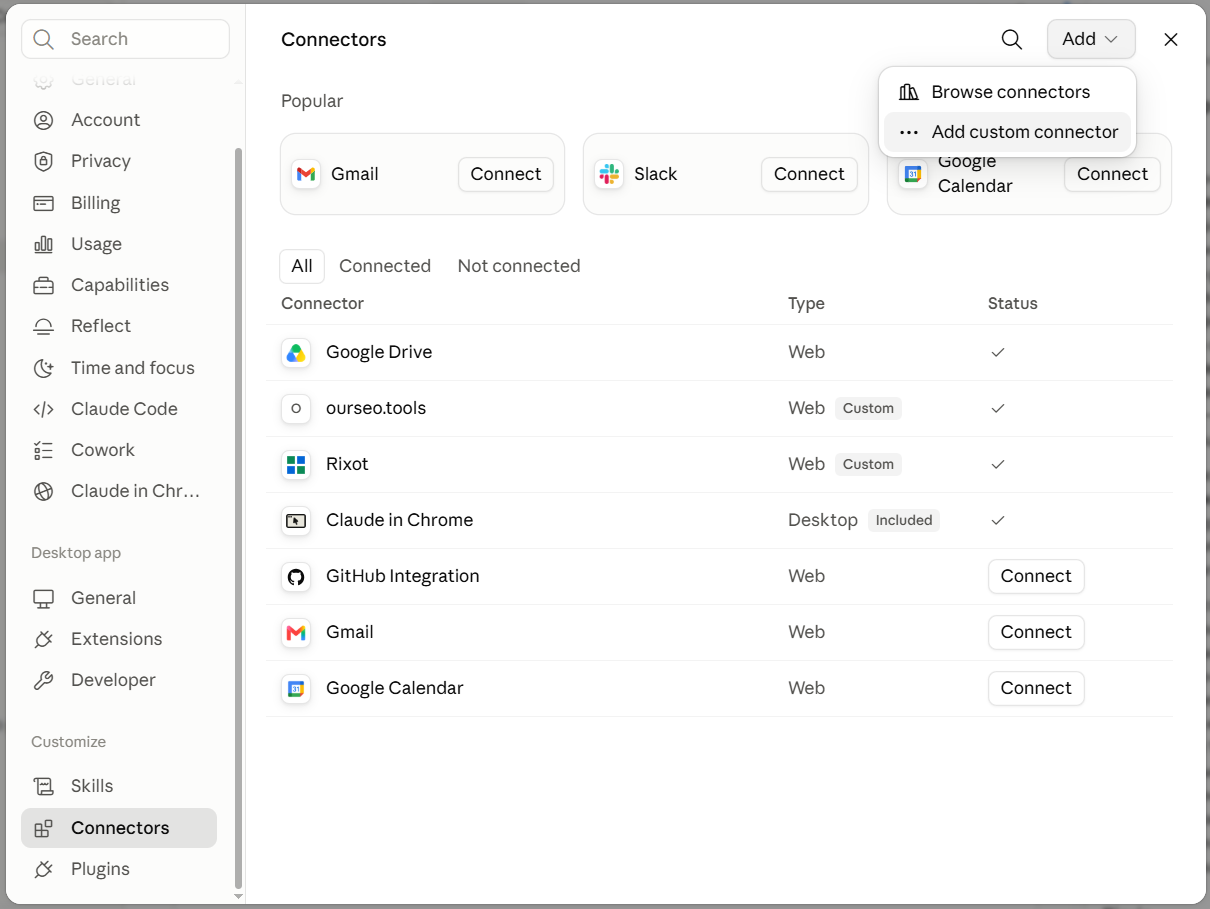
- Open Settings → Connectors
- Click Add custom connector
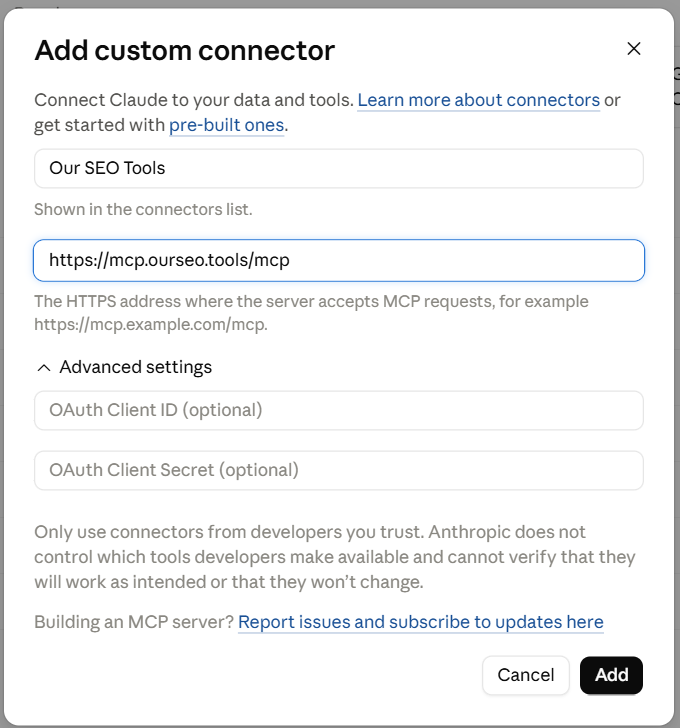
- Enter a name (e.g. Our SEO Tools) and the URL from step 1
- Click Add — no authorization is required, the connection is instant
3Just ask
Once connected, there's nothing else to set up. Example prompts:
- "Crawl safo.kiev.ua and show pages without a title"
- "Run an SEO checklist for safo.kiev.ua, only show errors"
- "Compare word counts across pages on safo.kiev.ua and example.com"
- "Find keyword data for 'seo audit' and show the top 10 by search volume"
- "What does safo.kiev.ua rank for in Ukraine? Use location 2804, language uk"